

 Best Seller
 Bulk Mockups Filler
Batch fill hundreds of mockups in one click
 Adobe Photoshop
 About
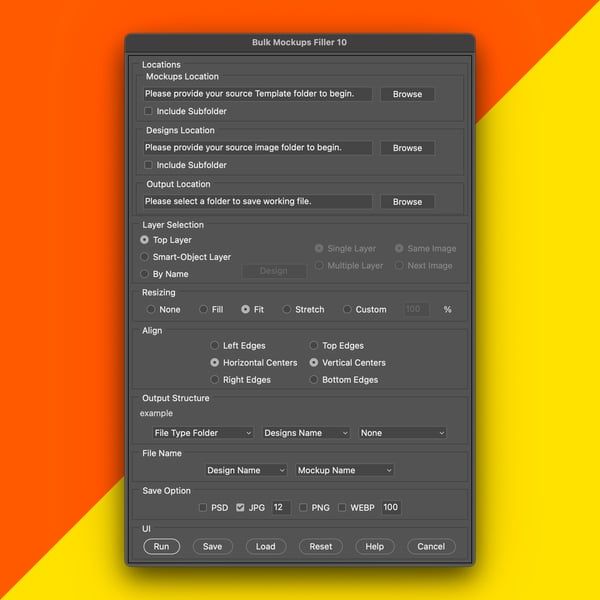
Bulk Mockups Filler is a smart automation tool for entrepreneurs and designers. It streamlines the mockup creation process by batch-processing smart objects in Adobe Photoshop.
Incredible Features
- Compatibility: Works with all kinds of templates (T-shirts, Phone Cases, Wall art, etc.)
- 3 Layer Selection: Select top layer or custom named smart-objects
- 5 Resize Options: None, Fill, Fit, Stretch, and Custom
- Output Formats: PSD, JPG, PNG, and WEBP
Installation
1
Download and extract the plugin files from the provided link.
2
Copy the extracted folder into the Photoshop "plugins" directory.
3
Restart Photoshop to activate the extension.
4
Open the plugin via: Window → Extensions → Bulk Mockups Filler.
5
Select your mockup PSD, choose designs, and click "Make"!

FAQ
What is Bulk Mockups Filler?
It is a smart automation tool for Photoshop that allows you to replace smart object content in bulk across multiple PSD templates automatically.
What resize options are available?
The plugin offers 5 resizing modes: None, Fill, Fit, Stretch, and Custom to ensure your design fits perfectly.
Which file formats are supported?
It supports major formats including SVG, AI, EPS, PSD, PSB, PNG, JPG, JPEG, RAW, and TIF.
Is there a money-back guarantee?
Yes, we offer a 7-day money-back guarantee if you are not satisfied with the product.
Can it be used for commercial purposes?
Yes, Bulk Mockups Filler can be used for commercial purposes provided the appropriate license is purchased.
Customer Reviews
—
0 reviews
No written reviews yet. Be the first to share your experience!
Review submitted! ✨